

Understanding NodeJs Concurrency
NodeJs has single-threaded, event-driven architecture. But sometimes, we need to handle computationally intensive tasks for which we may need to leverage multiple CPU cores and handle computationally intensive tasks. This is where NodeJs provides the followin powerful mechanisms:
- Cluster.
- Worker Threads.
- Child Processes.
Knowing when and how to use each method is essential to be able to create high-performance, scalable applications.
When I am interviewing candidates in most cases they struggle to provide a satisfactory response about this topic. So I thought I will try to explain this in simpler way and I hope this helps to get a better and a clear picture of the topic.
Breaking Down Node.js Threading Models
I am assuming that we already now that NodeJs operates on a single-threaded event loop architecture. The JavaScript code runs on a single thread, which is pretty good for I/O-intensive operations but could be a pain for CPU-heavy tasks.
Now, the NodeJs runtime environment uses several approaches to achieve concurrency and/or parallelism:
- Event Loop: Effectively manages asynchronous input/output operations.
- Thread Pool: Manages blocking operations like file system access.
- Cluster Module: Creates multiple NodeJs processes.
- Worker Threads: Enables true multithreading within a single process.
- Child Processes: Spawns separate processes for external programs.
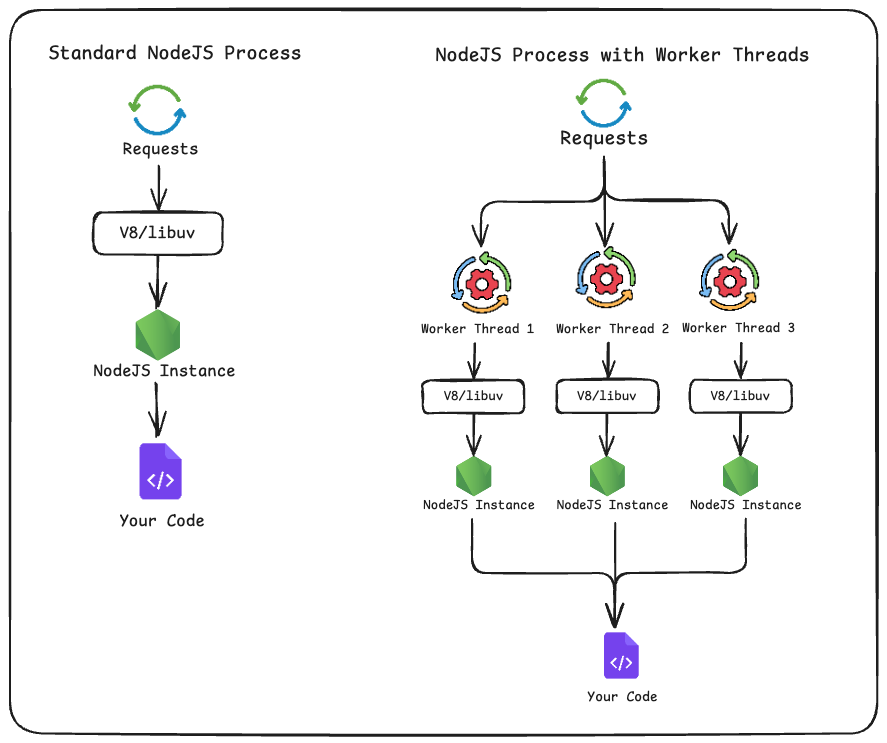
Comparison of standard process and worker threads models in Node.js showing parallel execution flows with the v8/libuv layers and user code
What Are Clusters in NodeJs?
The Cluster module allows you to create more than one NodeJs processes that share the same server port.
This means each process (also can be called a Worker Process) runs with its own separate event loop, memory space, and the V8 engine as a completely behaving as s separate NodeJs instance.
How do Clusters Operate?
The cluster module operates on a master-worker architecture with the following criteria:
- Master Process: Distributes incoming requests by acting as a Load Balancer.
- Worker Processes: Handles the client requests and actual application logic.
- Load Balancing: Uses round-robin algorithm by default to distribute requests among the workers.
Example of Basic Cluster Implementation
// Import the cluster module, which allows Node.js to create child processes (workers)
const cluster = require('cluster');

// Import the built-in HTTP module to create a server
const http = require('http');

// Get the number of CPU cores available on the machine
const numCPUs = require('os').cpus().length;

// Check if the current process is the master process
if (cluster.isMaster) {
  console.log(`Master ${process.pid} is running`);

  // Fork a new worker process for each CPU core to maximize parallelism
  for (let i = 0; i < numCPUs; i++) {
    cluster.fork();
  }

  // Listen for worker exit events (e.g., crash or manual kill)
  cluster.on('exit', (worker, code, signal) => {
    console.log(`Worker ${worker.process.pid} died`);

    // Automatically create a new worker to replace the one that died
    cluster.fork();
  });

} else {
  // If not master, this is a worker process — set up an HTTP server
  http.createServer((req, res) => {

    // Send an HTTP status code 200 (OK)
    res.writeHead(200);

    // Respond with the worker process ID so you know which worker handled the request
    res.end('Hello from worker ' + process.pid);

  // All workers listen on the same port (3000)
  }).listen(3000);

  console.log(`Worker ${process.pid} started`);
}
Characteristics of Clusters
Pros:
- High Availability: If one worker process crashes, other worker processes continue running so the incoming requests are always served.
- Load Distribution: Automatically distributes and balances requests across workers.
- Full Process Isolation: Worker A cannot influence Worker B, they can’t affect each other.
- Scalability: Utilizes all available CPU cores efficiently.
Cons:
- High Memory Usage: Each worker is a complete NodeJs instance in itself with its own instance of the V8 engine.
- No Shared Memory: The Workers cannot share variables or data among themselves directly.
- IPC Overhead: Any communication among the workers requires inter-process messaging.
What Are Worker Threads in NodeJS?
Worker Threads offer multithreading capabilities within a single NodeJS process. Unlike clusters, worker threads share the same process but run separately or we can say in separate threads with their own event loop and V8 instance.
How Worker Threads Work
Worker threads enable parallel JavaScript execution while maintaining some shared resources:
- Shared Process: All threads exist within the same NodeJs process.
- Isolated Context: Each thread has its own JavaScript execution context.
- Message Passing: Communication through
postMessage()and events. - Shared Memory: Can share data using
ArrayBufferandSharedArrayBuffer.
Basic Worker Thread Implementation
Main Thread (main.js):
// Import Worker, isMainThread flag, and parentPort from the worker_threads module
const { Worker, isMainThread, parentPort } = require('worker_threads');

if (isMainThread) {
  // MAIN THREAD SECTION ---------------------------------------

  // Create a new worker thread by re-running this same file (__filename)
  const worker = new Worker(__filename);

  // Send a message to the worker thread containing an array of numbers
  worker.postMessage({ numbers: [1, 2, 3, 4, 5] });

  // Listen for messages sent back from the worker thread
  worker.on('message', (result) => {
    console.log('Result from worker:', result);
  });

  // In case the worker throws an uncaught error, handle it here
  worker.on('error', (error) => {
    console.error('Worker error:', error);
  });

} else {
  // WORKER THREAD SECTION -------------------------------------

  // Receive messages sent from the main thread
  parentPort.on('message', ({ numbers }) => {

    // Perform CPU-intensive computation: sum of squares
    const sum = numbers.reduce((acc, num) => acc + (num * num), 0);

    // Send the result back to the main thread
    parentPort.postMessage({ sum });
  });
}
Separate Worker File (worker.js):
// Import parentPort for communication and workerData for receiving initial data
const { parentPort, workerData } = require('worker_threads');

// Log the data passed from the main thread when this worker is created
console.log('Worker received:', workerData);

// Define a CPU-intensive Fibonacci function (recursive and intentionally heavy)
function fibonacci(n) {
  if (n < 2) return n;                 // Base case for n = 0 or 1
  return fibonacci(n - 1) + fibonacci(n - 2); // Recursive calculation
}

// Perform a heavy computation (fibonacci(35) takes noticeable CPU time)
const result = fibonacci(35);

// Send the computed result back to the main thread
parentPort.postMessage({ result });
Key Characteristics of Worker Threads
Pros:
- Shared Memory Access: Efficient data sharing with
SharedArrayBuffer. - Lower Resource Usage: Less memory overhead than separate processes.
- Fast Startup: Quicker to create than new processes.
- CPU Task Optimization: Perfect for computationally intensive work.
Cons:
- Limited I/O Benefits: Not ideal for I/O-intensive operations.
- Shared Process Risks: Issues in a worker thread can potentially affect the main process.
- Complex Debugging: Multi-threaded debugging can be complicated and challenging.
What Are Child Processes in NodeJs?
Child Processes allow you to spawn completely separate processes that can run any system command or external program. They provide the highest level of isolation and are ideal for running non-JavaScript programs.
Types of Child Processes
NodeJs provides the below methods to create child processes:
spawn(): Launches any system command with streaming I/O.exec(): Executes commands and buffers the output.execFile(): Similar to exec but for executable files.fork(): Special case of spawn for NodeJs processes.
Child Process Implementation Examples
Using spawn() for system commands:
// Import the spawn method from child_process to run system commands
const { spawn } = require('child_process');

// Execute a system command using spawn
// 'ls' is the command, ['-la', '/usr'] are the arguments (list all files in /usr)
const ls = spawn('ls', ['-la', '/usr']);

// Listen for standard output data from the spawned process
ls.stdout.on('data', (data) => {
  console.log(`Output: ${data}`);
});

// Listen for error output (stderr) from the spawned process
ls.stderr.on('data', (data) => {
  console.error(`Error: ${data}`);
});

// Triggered when the spawned process exits; provides the exit code
ls.on('close', (code) => {
  console.log(`Process exited with code ${code}`);
});
Using fork() for Node.js processes:
// parent.js
const { fork } = require('child_process');

// Create a new child process by forking the specified JS file
const child = fork('./child-process.js');

// Send a message to the child process
child.send({ message: 'Hello from parent' });

// Listen for messages sent back from the child process
child.on('message', (response) => {
  console.log('Response from child:', response);
});

// child-process.js
// Listen for messages sent from the parent process
process.on('message', (data) => {
  console.log('Received:', data);

  // Perform some work using the received message
  const result = data.message.toUpperCase();  // Convert message to uppercase

  // Send processed result back to the parent process
  process.send({ response: result });
});
Key Characteristics of Child Processes
Pros:
- Complete Isolation: Child processes cannot affect each other.
- External Program Support: Can run any system command or program.
- Language Interoperability: Can execute programs written in other languages.
- System Resource Access: Have access to full system capabilities.
Cons:
- Highest Memory Usage: Each process has uses highest memory available and is complete overhead.
- Slower Startup: Creating a child process takes more time that the other processes mentioned above.
- Complex Communication: Requires IPC mechanisms for data exchange between the child processes.
Comprehensive Comparison: When to Use Each Approach
| Feature | Cluster Module | Worker Threads | Child Processes |
|---|---|---|---|
| Architecture | Multi Process | Single Process | Separate Process |
| Memory Model | Isolated memory | Shared Memory | Full Isolation |
| Communication | Inter Process Communication | Message Pass | IPC |
| Primary Use | Load Balancing | CPU intensive | External Programs |
| Performance | High Memory | Low Memory | Highest Memory |
| Isolation | Full Isolation | Thread Level | Complete Isolation |
| Startup Speed | Slower | Faster | Slowest |
| Best suited for | Web Apps | Data Process | System Commands |
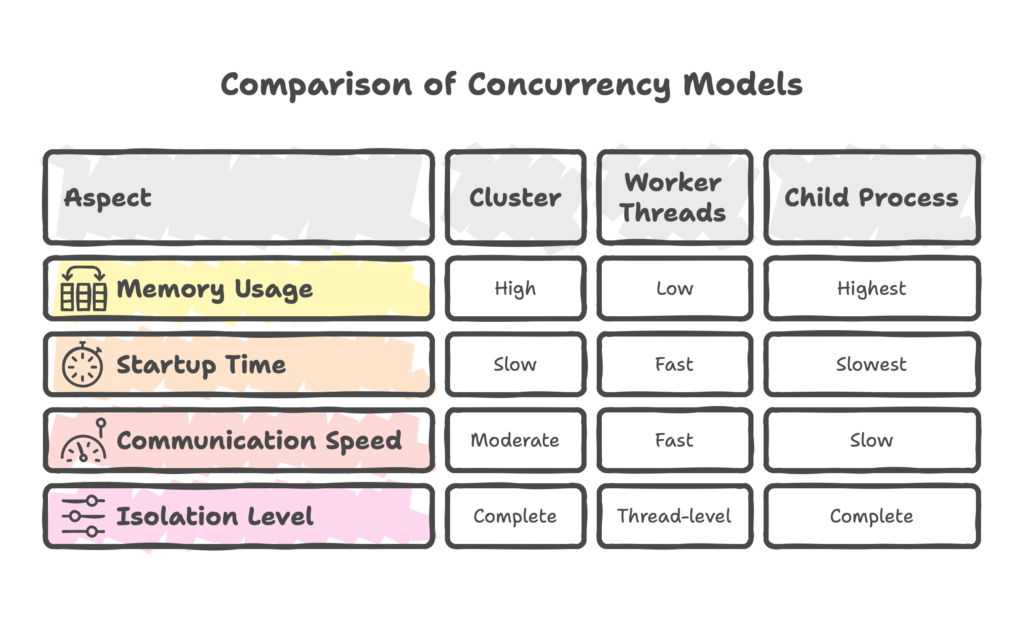
Comprehensive comparison of NodeJs concurrency approaches: Cluster, Worker Threads, and Child Processes
Performance Comparison
Use Case Selection Guide
Use Clusters When:
- Building high-traffic web servers that require to handle multiple concurrent requests.
- Implementing load balancing backend applications.
- Creating fault-tolerant systems where process isolation is important.
- Scaling I/O-intensive applications across multiple CPU cores.
Use Worker Threads When:
- Performing CPU-heavy tasks like image processing or data analysis.
- Running parallel mathematical computations or algorithms.
- Processing large datasets that can benefit from shared memory.
- Implementing background tasks that shouldn’t block the main thread.
Use Child Processes When:
- Executing system commands or external programs.
- Running applications written in other programming languages.
- Performing tasks that require complete isolation.
Practical Examples and Best Practices
Building a High-Performance Web Server with Clusters
// Load the cluster module to create multiple worker processes
const cluster = require('cluster');

// Load Express framework for handling HTTP requests
const express = require('express');

// Get the number of CPU cores to determine how many workers to create
const numCPUs = require('os').cpus().length;

// Check whether this process is the master process
if (cluster.isMaster) {
  console.log(`Master ${process.pid} starting ${numCPUs} workers`);

  // Create one worker per CPU core to maximize concurrency
  for (let i = 0; i < numCPUs; i++) {
    cluster.fork();
  }

  // Restart worker if it crashes or exits unexpectedly
  cluster.on('exit', (worker, code, signal) => {
    console.log(`Worker ${worker.process.pid} died. Restarting...`);
    cluster.fork();
  });

} else {
  // Worker process: create an Express application instance
  const app = express();

  // Basic route to return worker info
  app.get('/', (req, res) => {
    res.json({
      message: 'Hello from worker',
      pid: process.pid,
      timestamp: new Date().toISOString()
    });
  });

  // Simulate CPU-intensive endpoint to test load and worker distribution
  app.get('/heavy', (req, res) => {
    const start = Date.now();

    // Perform a heavy, blocking loop to simulate CPU usage
    let result = 0;
    for (let i = 0; i < 1000000; i++) {
      result += Math.random();
    }

    // Respond with processing details
    res.json({
      result,
      worker: process.pid,
      duration: Date.now() - start
    });
  });

  // Start listening for requests on port 3000
  app.listen(3000, () => {
    console.log(`Worker ${process.pid} listening on port 3000`);
  });
}
    // Diagram of the Node.js master–worker cluster architecture.
                 ┌────────────────────────────-───┐
                 │         MASTER PROCESS         │
                 │        PID: (e.g., 12345)      │
                 ├──────────────────────────────-─┤
                 │ - Starts N workers (numCPUs)   │
                 │ - Monitors worker lifecycle    │
                 │ - Restarts workers if they die │
                 └───────────────┬─────────-──────┘
                                 │
       ┌─────────────────────────┼─────────────────────────┐
       │                         │                         │
       ▼                         ▼                         ▼
┌──────────────┐         ┌──────────────┐         ┌──────────────┐
│ WORKER 1     │         │ WORKER 2     │         │ WORKER N     │
│ PID: 12351   │         │ PID: 12352   │         │ PID: 1235N   │
├──────────────┤         ├──────────────┤         ├──────────────┤
│ - Runs server│         │ - Runs server│         │ - Runs server│
│ - Handles    │         │ - Handles    │         │ - Handles    │
│   incoming   │         │   incoming   │         │   incoming   │
│   HTTP reqs  │         │   HTTP reqs  │         │   HTTP reqs  │
└───────┬──────┘         └───────┬──────┘         └───────┬──────┘
        │                        │                        │
        │                        │                        │
        ▼                        ▼                        ▼
  Incoming HTTP            Incoming HTTP            Incoming HTTP
       Requests                 Requests                 Requests
      (Load-balanced by OS kernel across workers)
CPU-Intensive Processing with Worker Threads
// main.js - Image processing service

// Import Worker for multi-threading and Express for API handling
const { Worker } = require('worker_threads');
const express = require('express');

const app = express();

// Endpoint to process images using worker threads
app.post('/process-image', async (req, res) => {
  try {
    // Offload heavy CPU image processing to a worker thread
    const result = await processImage(req.body.imageData);
    res.json({ success: true, result });
  } catch (error) {
    // Send error back if worker failed or processing threw an exception
    res.status(500).json({ error: error.message });
  }
});

function processImage(imageData) {
  return new Promise((resolve, reject) => {

    // Create a worker thread and pass imageData as workerData
    const worker = new Worker('./image-worker.js', {
      workerData: imageData
    });

    // When worker completes processing, resolve the promise
    worker.on('message', resolve);

    // Forward worker thread errors to the promise reject
    worker.on('error', reject);

    // If worker exits unexpectedly or with non-zero code, treat as a failure
    worker.on('exit', (code) => {
      if (code !== 0) {
        reject(new Error(`Worker stopped with exit code ${code}`));
      }
    });
  });
}

// image-worker.js - Dedicated image processing

// Import workerData (input data) and parentPort to send back result
const { parentPort, workerData } = require('worker_threads');

function processImage(imageData) {
  // Simulate CPU-heavy image processing logic
  const processed = imageData.map(pixel => {
    // Example transformation: adjust RGB scaling
    return {
      r: Math.min(255, pixel.r * 1.2),   // Increase red channel
      g: Math.min(255, pixel.g * 1.1),   // Slightly increase green
      b: Math.min(255, pixel.b * 0.9)    // Slightly darken blue
    };
  });

  return processed;
}

// Perform processing using workerData sent from main.js
const result = processImage(workerData);

// Send processed image data back to main thread
parentPort.postMessage(result);
// Diagram showing how main thread and worker thread interact in the image-processing system.

                     ┌────────────────────────────────────┐
                     │            MAIN THREAD             │
                     │          (main.js / Express)       │
                     ├────────────────────────────────────┤
Incoming HTTP POST → │ 1. Receive /process-image request  │
  with image data    │                                    │
                     │ 2. Call processImage(imageData)    │
                     └───────────────┬────────────────────┘
                                     │
                                     │ Creates worker thread
                                     ▼
                    ┌──────────────────────────────────-────┐
                    │         WORKER THREAD                 │
                    │      (image-worker.js instance)       │
                    ├─────────────────────────────────-─────┤
                    │ 3. Receives workerData (image pixels) │
                    │ 4. Runs CPU-intensive processing      │
                    │       - pixel transformations         │
                    │       - filters, adjustments          │
                    │ 5. Returns processed data via         │
                    │       parentPort.postMessage()        │
                    └────────────────┬──────────────────────┘
                                     │
                                     │ Sends result back
                                     ▼
                     ┌──────────────────────────────────────┐
                     │             MAIN THREAD              │
                     ├──────────────────────────────────────┤
                     │ 6. Worker emits "message" event      │
                     │ 7. Resolve promise with result       │
                     │ 8. Respond to client: { success: ✓ } │
                     └──────────────────────────────────────┘
System Integration with Child Processes
// Import spawn and exec to run system-level commands
const { spawn, exec } = require('child_process');
const express = require('express');

const app = express();

// File conversion service using external tools
app.post('/convert-video', (req, res) => {
  const { inputFile, outputFile, format } = req.body;

  // Use FFmpeg (external program) to convert video format
  // spawn is used for streaming large outputs efficiently
  const ffmpeg = spawn('ffmpeg', [
    '-i', inputFile,  // Input video file
    '-f', format,     // Target output format
    outputFile        // Output file path
  ]);

  let output = '';
  let error = '';

  // Collect any standard output FFmpeg generates
  ffmpeg.stdout.on('data', (data) => {
    output += data.toString();
  });

  // Collect error/warning output (FFmpeg writes most logs to stderr)
  ffmpeg.stderr.on('data', (data) => {
    error += data.toString();
  });

  // Once FFmpeg finishes execution
  ffmpeg.on('close', (code) => {
    if (code === 0) {
      // Successful conversion
      res.json({
        success: true,
        output: outputFile,
        details: output
      });
    } else {
      // Conversion failed or FFmpeg returned non-zero status
      res.status(500).json({
        error: 'Conversion failed',
        details: error
      });
    }
  });
});

// System health monitoring endpoint
app.get('/system-info', (req, res) => {

  // Run system command to fetch top 10 running processes
  exec('ps aux | head -10', (error, stdout, stderr) => {
    if (error) {
      // Command execution error
      return res.status(500).json({ error: error.message });
    }

    // Return process list along with timestamp
    res.json({
      processes: stdout,
      timestamp: new Date().toISOString()
    });
  });
});
// Diagram showing how Express service spawns FFmpeg and how data flows between them.

                     ┌──────────────────────────────────────┐
                     │           CLIENT (API USER)          │
                     ├──────────────────────────────────────┤
   POST /.           │                                      │
   convert-video.    │ Sends inputFile, outputFile, format  │
           ─────────►│                                      │
                     └───────────────┬──────────────────────┘
                                     │
                                     ▼
                     ┌────────────────────────────────────────┐
                     │      EXPRESS SERVER (Node.js)          │
                     │              main thread               │
                     ├────────────────────────────────────────┤
                     │ 1. Receive /convert-video request      │
                     │ 2. Call spawn('ffmpeg', [...])         │
                     │        → Creates child FFmpeg process  │
                     └───────────────┬────────────────────────┘
                                     │
                                     │ Child Process Created
                                     ▼
                    ┌────────────────────────────────────────┐
                    │        FFmpeg PROCESS (Child)          │
                    ├────────────────────────────────────────┤
                    │ - Executes actual video conversion     │
                    │ - Writes progress/logs to stderr       │
                    │ - Writes occasional info to stdout     │
                    └───────────────┬────────────────────────┘
                                     │
       ┌─────────────────────────────┼──────────────────────────────┐
       │                             │                              │
       ▼                             ▼                              ▼
┌───────────────┐           ┌────────────────┐           ┌──────────────────┐
│ stdout stream │           │ stderr stream  │           │ exit event       │
│ (data logs)   │           │ (warnings,     │           │ (exit code)      │
│               │           │ progress info) │           │                  │
└─────┬─────────┘           └──────────┬─────┘           └──────────┬───────┘
      │                                │                            │
      ▼                                ▼                            ▼
┌───────────────┐             ┌──────────────────────┐      ┌─────────────────────┐
│ Node collects │             │ Node collects        │      │ Node checks exit    │
│ ffmpeg.stdout │             │ ffmpeg.stderr        │      │ code to determine   │
│ (output text) │             │ (errors / progress)  │      │ success/failure     │
└─────┬─────────┘             └──────────┬───────────┘      └──────────┬──────────┘
      │                                  │                             │
      ▼                                  ▼                             ▼
                     ┌──────────────────────────────────────┐
                     │      EXPRESS SERVER RESPONSE         │
                     ├──────────────────────────────────────┤
                     │ If exit code = 0 → success           │
                     │ If exit code != 0 → conversion failed│
                     └───────────────────┬──────────────────┘
                                         │
                                         ▼
                     ┌──────────────────────────────────────┐
                     │              CLIENT                  │
                     ├──────────────────────────────────────┤
                     │ Receives JSON: result or error       │
                     └──────────────────────────────────────┘
Performance Optimization Tips
Cluster Optimization
- Right-size Worker Count: Don’t always use
os.cpus().lengthfor local setup use 1 or 2 workers.
javascriptconst numWorkers = process.env.NODE_ENV === 'production'
  ? require('os').cpus().length
  : 2;
- Implement Graceful Shutdown:
javascriptprocess.on('SIGTERM', () => {
  server.close(() => {
    process.exit(0);
  });
});
Worker Thread Optimization
- Pool Worker Threads for better resource management:
javascriptclass WorkerPool {
  constructor(size, workerScript) {
    this.workers = [];
    this.queue = [];

    for (let i = 0; i < size; i++) {
      this.workers.push(new Worker(workerScript));
    }
  }

  execute(data) {
    return new Promise((resolve, reject) => {
      const worker = this.workers.pop();
      if (worker) {
        worker.postMessage(data);
        worker.once('message', (result) => {
          resolve(result);
          this.workers.push(worker);
        });
      } else {
        this.queue.push({ data, resolve, reject });
      }
    });
  }
}
- Use SharedArrayBuffer for large data sharing:
javascriptconst sharedBuffer = new SharedArrayBuffer(1024);
const sharedArray = new Int32Array(sharedBuffer);
Child Process Optimization
- Reuse Long-Running Processes:
javascriptclass ProcessManager {
  constructor() {
    this.processes = new Map();
  }

  getProcess(command) {
    if (!this.processes.has(command)) {
      this.processes.set(command, spawn(command, { stdio: 'pipe' }));
    }
    return this.processes.get(command);
  }
}
Common Pitfalls and How to Avoid Them
Memory Leaks
- Cluster: Always handle worker exit events.
- Worker Threads: Properly terminate workers when done.
- Child Process: Clean up event listeners and close streams.
Error Handling
javascript*// Always implement comprehensive error handling*
worker.on('error', (error) => {
  console.error('Worker error:', error);
  *// Implement recovery strategy*
});

process.on('uncaughtException', (error) => {
  console.error('Uncaught exception:', error);
  process.exit(1);
});
Resource Management
javascript*// Implement timeouts for long-running operations*
const timeout = setTimeout(() => {
  worker.terminate();
}, 30000); *// 30 second timeout*

worker.on('message', (result) => {
  clearTimeout(timeout);
  *// Process result*
});
Conclusion
I hope you were able to understand the differences between NodeJs Clusters, Worker Threads, and Child Processes. Each approach serves a different purpose:
- Clusters excel at scaling I/O-intensive web applications across multiple cores.
- Worker Threads are perfect for CPU-intensive tasks that benefit from shared memory.
- Child Processes provide the ultimate isolation for running external programs and system commands.
Choose the specific method for your use case. During your implementation, always consider factors like resource usage, isolation requirements, communication needs, and the nature of your workload when making this decision.
Additional Resources
For further learning about NodeJs concurrency and performance optimization, explore these valuable resources:
- Official Node.js Cluster Documentation – Comprehensive guide to the cluster module
- Node.js Worker Threads Documentation – Complete worker threads API reference
- Child Process Documentation – Detailed child process methods and examples
- Node.js Performance Best Practices – Official performance optimization guide
- Understanding the Node.js Event Loop – Deep dive into NodeJs internals

Ahaa, its nice conversation regarding this piece of writing at this place at this blog, I have read all that, so now me also commenting here.